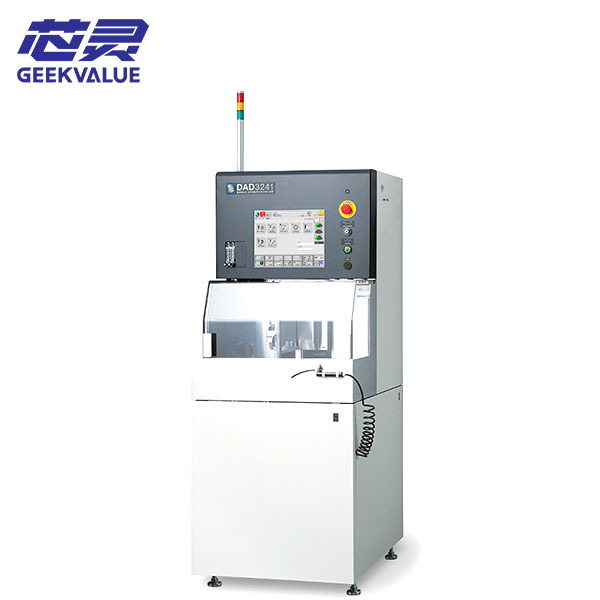
The DISCO DAD324 is a compact automatic dicing saw used for precision cutting of compatible semiconductor wafers, electronic components, glass, ceramics and other materials. It uses a single high-torque spindle and supports workpieces up to 6 inches, while 150 × 150 mm square workpieces require the applicable special machine configuration.
For an initial inquiry, send your current dicing-saw model, clear photos of the wafer or workpiece and a short description of the required cutting process or current machine problem. Detailed blade, material and cutting-street information can be reviewed later when necessary.
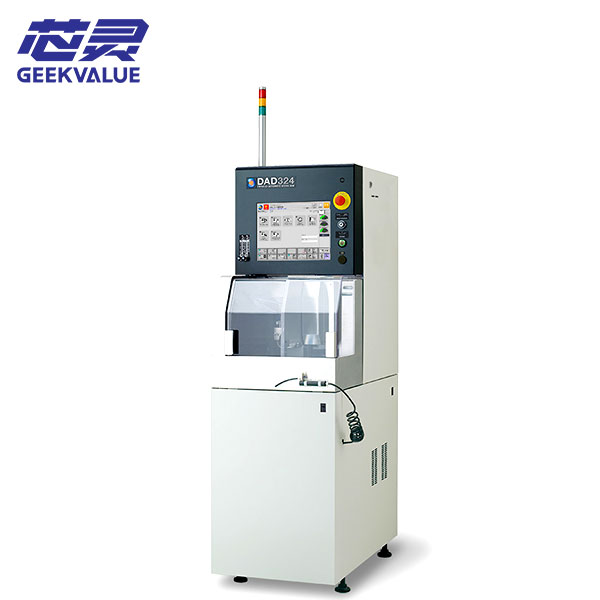
DISCO DAD324 Machine Information
| Manufacturer | DISCO |
|---|---|
| Model | DAD324 |
| Equipment Type | Compact automatic single-spindle dicing saw |
| Maximum Workpiece Size | Up to Φ6 inches under the standard model specification |
| Special Workpiece Support | Up to 150 × 150 mm with the applicable special configuration |
| X-Axis Cutting Range | 160 mm |
| X-Axis Feed Speed | 0.1–800 mm/sec |
| Y-Axis Cutting Range | 162 mm |
| Spindle Output | 2.0 kW at 40,000 min⁻¹ |
| Spindle Speed Range | 3,000–40,000 min⁻¹ |
| Standard Functions | Automatic alignment, autofocus, automatic kerf check and Non-Contact Setup |
| Standard Blade Diameter | 55.56 mm |
| Maximum Workpiece Thickness | Up to 1.2 mm under the applicable standard blade specification |
| Machine Dimensions | Approximately 490 × 870 × 1,670 mm |
| Machine Weight | Approximately 420 kg |
| Condition | Pre-owned precision dicing equipment |
| Delivery Scope | Based on the quotation and confirmed equipment list |
| Shipping | Export packing and worldwide delivery |
Wafer and Workpiece Compatibility
The DAD324 model capacity does not automatically confirm that an available machine can process every wafer, substrate or electronic component. Compatibility also depends on the workpiece material, dimensions, thickness, cutting-street width, required kerf, blade specification, spindle condition and holding method.
Only basic information is needed for the first discussion:
- Your current dicing-saw model if the DAD324 will replace existing equipment
- Clear photos of the wafer, substrate or electronic component
- A close-up photo of the cutting street or current cutting result where available
- A short description of the required cutting process or existing problem
Detailed drawings, material data, street dimensions, blade specifications and cutting parameters can be reviewed later when the available machine appears relevant to the project.
Spindle, Blade and Alignment Setup
The DAD324 uses a 2.0 kW high-torque spindle for compatible semiconductor wafers and electronic components. Cutting quality still depends on the blade material and thickness, flange condition, spindle runout, workpiece holding, cutting-water delivery, alignment and process settings.
The machine also uses Non-Contact Setup to measure the blade position without physical contact and includes automatic alignment, autofocus and automatic kerf-check functions. Existing blades, flanges or fixtures should not be assumed to fit the available machine without checking its actual spindle, table and workpiece setup.
DAD324 Machine Configuration and Delivery Scope
Individual DISCO DAD324 machines may differ in worktables, wafer or component fixtures, alignment optics, communication functions, cutting-water equipment, transformers, software and external utility accessories. Before purchase, the available unit should be reviewed to confirm whether its actual spindle, table and holding configuration is suitable for the intended material and cutting process. The final delivery scope is based only on the quotation and confirmed equipment list; blades, flanges, fixtures, wafer frames, chillers, water-treatment equipment, transformers, computers and external utility systems are included only when specifically stated.
Receiving, Startup and Initial Cutting Trial
The DAD324 should be inspected and tested in stages before valuable production workpieces are introduced.
- Inspect the packing, machine cabinet, spindle area, worktable, microscope, control panel and visible utility connections.
- Photograph any impact marks, loose components, damaged cables or displaced assemblies before moving the machine.
- Compare the received machine, blade flanges, fixtures, pumps and accessories with the confirmed delivery list.
- Check that the spindle, worktable, microscope and motion axes remain secured after transportation.
- Confirm the electrical supply, grounding, compressed air, vacuum, cutting water, cooling and drainage requirements.
- Start the controller and record all alarm messages before resetting the machine or changing cutting parameters.
- Check table movement, spindle rotation, alignment, autofocus, water flow and related safety functions without a production workpiece.
- After basic operation is stable, use a suitable blade and non-production sample for an initial cutting trial.
Inspect the cutting street before increasing feed speed or cutting depth. Repeat several cuts to check consistency, and stop testing if spindle vibration, abnormal noise, unstable alignment, water-flow problems or repeated alarms occur.
Cutting Results, Alarms and Parts Support
Chipping, excessive kerf, blade marks, incomplete cutting or unstable cutting depth may involve blade selection, spindle runout, flange condition, workpiece holding, alignment, feed speed, cutting depth or cutting-water conditions.
Position errors may also involve the worktable, microscope calibration, theta alignment, autofocus, encoder feedback or incorrect product data. The cutting result and machine condition should be reviewed together before process parameters are repeatedly changed.
Record the alarm message and the stage at which the problem occurs before resetting the machine. Photos of the blade, flange, workpiece, cutting street, chuck table and alarm screen, together with a short operating video where available, can provide a practical starting point for review.
Our team can assist with initial fault analysis, blade and component identification, replacement-part matching and repair discussion. Related spindles, motors, drivers, boards, sensors, cameras, cables, valves, pumps, water-system components and motion parts can also be checked where available.
Frequently Asked Questions
Can the DISCO DAD324 cut our wafer or electronic component?
This depends on the workpiece material, dimensions, thickness, cutting street, blade, spindle and holding configuration. Send workpiece and current cutting-result photos for an initial review.
Can every DAD324 process 150 × 150 mm square workpieces?
No. Support for 150 × 150 mm square workpieces requires the applicable special configuration. The worktable and holding setup of the available machine must be confirmed.
What is the difference between the DAD324 and DAD3240?
The DAD324 is a compact 6-inch machine with a 2.0 kW spindle, while the DAD3240 is a separate 8-inch model with different dimensions, spindle specifications and workpiece capacity. Their specifications should not be mixed.
Are blades, flanges and workpiece fixtures included?
Only blades, flanges, fixtures and related accessories listed in the quotation or confirmed delivery scope are included.
Can you assist with spindle alarms or poor cutting results?
Yes. Send the machine model, alarm information, blade and flange photos, close-up images of the cutting result and an operating video where available. We can assist with initial fault review, parts matching and repair discussion.
Contact Us About the DISCO DAD324
Send your current dicing-saw model, wafer or workpiece photos and a short description of the required cutting process or equipment problem. We will review the basic application first and continue with the necessary blade, spindle, fixture, replacement-parts or repair details afterward.